


Skip to content

FOR GROWING MARKETING AGENCIES

Be the team
your clients love.

Give clients a copilot under your agency’s brand. It helps them get set up, answers everyday questions in chat, and gives your team more time for strategy.

A smiling agency client with the orange Team.Love copilot
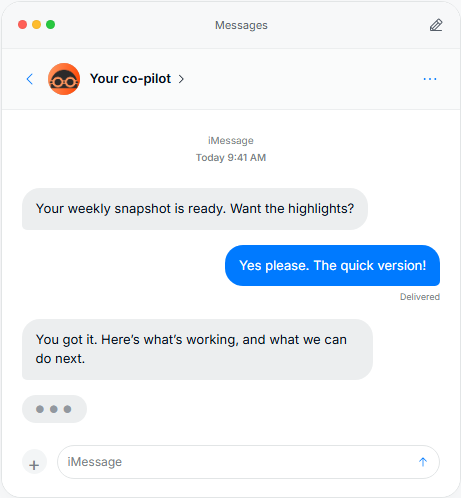
Copilot preview offering a client their weekly marketing highlights
Client copilot preview

A smart copilot for every client

Drives results and shows what worked in the chats and tools you already use.

Apple Messages
WhatsApp
Text messagesPlanned
Slack
MXPilot
EmailPlanned
Voice AIPlanned
A client using her phoneYour clients
BRAND BRAIN
Agents
Memory
Guardrails
Skills
Vaults
Your smart copilot at work
ChatGPT
Claude
Gemini

Perplexity
Grok
MXPilot
An agency team collaborating at a laptopYour agency’s team

Apple Messages uses Apple Messages for Business. External AI tools connect through your client’s approved setup.

WHAT CLIENTS LOVE

Give clients a clear next step, in chat, under your brand.

Give clients answers in the chats they already use.

Client conversation with a copilot offering the weekly marketing highlights
SlackWhatsAppApple Messages for Business

A familiar conversation, with the right client context.

Keep clients up to date on what’s done, what’s next, and what you need from them.

Your copilot

Here’s where things stand.

Done

Your campaign brief is prepared.

Next

Your agency reviews the plan.

Needed from you

Feedback on the creative direction.

BRAND BRAIN

✳   Agents

▯   Memory

◎   Guardrails

◇   Skills

▤   Vaults

Illustrative client update

Give clients one link to sign and connect the accounts you need to start.

1Make it official

Review your agency’s offer and sign the agreement.

2Connect your accounts

Choose which accounts to share with your agency.

3Ready to go

Your agency has what it needs to start work.

Progress

AgreementReviewed
Brand detailsAdded
Marketing accountsConnected
Agency readiness reviewNext

Illustrative setup · the required accounts depend on your offer.

WHAT AGENCIES NEED

See which accounts need your attention, right from chat.

Your agency

Channels

#   mxpilot-acme

#   mxpilot-bloom

#   mxpilot-harbor

Direct messages

✳   Agency Co-Pilot

Agency Co-Pilot

KP

Kenny Park 11:55

What’s the latest across my clients?

✳

Agency Co-Pilot 11:56

Acme: Waiting for feedback on the creative.

Bloom: Accounts are connected and onboarding is complete.

Harbor: The client asked to move the launch to Friday.

Illustrative agency conversation

WHAT AGENCIES REPEAT FOR EVERY CLIENT

Run campaigns across platforms

Update clients and show impact

Find growth opportunities before clients ask

60+ MARKETING CHANNELS & TOOLS

Google Ads
Claude
Instagram
Reddit
TikTok
Facebook
Shopify
YouTube
ChatGPT
Uber Eats

Across the accounts your clients connect, with the permissions your agency sets.

Set what AI can access and what needs your approval.

Access Policy

Set permissions for your client’s connected tools. Keep the decisions that matter with your team.

Brand rulesEffective access
ActionPermissionApplies to
Read connected dataAllowThis client
Create a campaignAskThis client
Change spending limitAskThis client
Unapproved actionsBlockThis client

Illustrative policy view. Your agency chooses the permissions.

SPECIALIST AGENTS

Specialist agents.
One shared Brand Brain.

Research, creative production, and campaign management—grounded in each client’s context, with the instructions and permissions your agency sets.

AGENT
Research

Business & Competitor Researchers

Explore the business, audience, offers, and competitor activity. Bring source-backed findings into your next brief.

PRIMARY OUTPUT

Research
brief

Context for the next move
YOUR CHECKPOINT

Source
review

Evidence you can assess
BusinessCompetitorsPublic ads
AGENT
Creative

Ad Creative
Producer

Turn the brief, brand context, and supplied photos into image and short-video options for your team to review.

PRIMARY OUTPUT

Creative
options

Images and short videos
YOUR CHECKPOINT

Creative
review

Your agency’s judgment
Brand contextImagesShort video
AGENT
Paid acquisition

Meta Ads
Manager

Plan, build, and manage a campaign within the approved budget and spending limit—with your agency reviewing the next move.

PRIMARY OUTPUT

Campaign
plan

From brief to paid media
YOUR CHECKPOINT

Launch
approval

Plan, budget, spending limit
Meta AdsBudgetApprovals

Create agency-owned agents.

Add your instructions and skills. Configure them for each client.

Available agents and actions depend on your connected tools and approved setup.

From agency setup to client kickoff

A REASON TO GET STARTED

Give clients a head start.
Make the value clear.

Put marketing credit and platform credit into your branded onboarding offer. Clients see what’s included, sign the agreement, and connect their accounts in one place.

Discuss your agency’s offer

YOUR CLIENT’S ONBOARDING OFFER

Marketing credit$100
Platform credit$100
Included onceYour agency’s copilot

Marketing credit for the client’s agreed marketing activities.

Platform credit for platform usage.

Both included once. Expire at the end of the agreement. Your agency defines the offer and credit terms.

01

Set up your agency

Add your branding and create the offer you’ll send to clients.

Agency copilot guiding agency setup and branding
02

Send a branded invite

Give each client one link to review your offer and get set up.

AN INVITATION FROM YOUR AGENCY

Let’s grow your brand.

YOUR AGENCY’S OFFER

A clear plan for your brand.

Let’s get started →
03

Get clients ready

Clients sign and connect their accounts so your team can get to work.

Brands

The brands and client workspaces your team can access.

BrandReadiness
Acme StudioReady
HarborConnecting

Illustrative product previews of the agency and client onboarding experience.

A FEW GOOD QUESTIONS

Frequently asked questions.

The practical things an agency needs to know.

Who is Team.Love for?

Growing marketing agencies that want a more connected client experience. Start with one client and one workflow, then explore how the copilot can support your team’s way of working.

Which agents can our agency use?

Examples include business and competitor research, ad creative production, and Meta campaign work. Your agency can also create agents with its own instructions and skills, then configure them for each client.

Who decides what AI can do?

Your agency sets access rules for connected accounts and tools. Actions can be allowed, require approval, or be blocked. For Meta campaign work, your team reviews the plan, budget, and spending limit.

Where can clients talk to the copilot?

Slack and WhatsApp are supported through configured connections. Apple Messages for Business can also be configured. We’ll confirm the right channels and setup for your agency during the introduction.

Can we use our agency’s branding?

Yes. Client onboarding can use your agency’s name, logo, brand color, offer, and agreement. Team.Love is built on MXPilot; the branding clients see in connected messaging services depends on the channel.

Can our team use its own AI tools?

Compatible AI clients can connect to a client’s Brand Brain and permitted tools through MCP. This gives your team access to the same client context. We’ll confirm the connection and setup for the tools you use.

LET’S START WITH YOUR AGENCY

See Team.Love
for your agency.

Explore your branded client copilot, connected tools, and specialist agents. Tell us about your agency and we’ll arrange an introduction.

♥

Your expertise.
A little closer to every client.

REQUEST AN AGENCY INTRO

Let’s meet your team.

Tell us a little about your agency. We’ll follow up to arrange a conversation.

We’ll use these details to respond to your inquiry. No mailing-list signup.

Thanks for the introduction. We’ve received your request and will follow up to arrange a conversation.
Your request couldn’t be sent. Please check your connection and try again.